
Estimated reading time: 5 minutes
Introduction
You have probably seen this scenario before. Your team deployed several features over the course of the month. The dashboards were green. Availability was within the SLO, error rates were normal and traffic was stable. Nothing out of the ordinary.
Then your cloud provider’s bill arrives.
It is 40% higher than the previous month. There was no obvious incident. No alerts fired. And now you face a week of digging through your cloud provider’s billing data, trying to work out what changed, who scaled what, and whether that new service you deployed in Kubernetes was really as harmless as it seemed.
This is not a cost problem. It is a visibility problem. More specifically, it is a symptom of monitoring systems in real time while managing costs months behind.
In this post, we explore how to bring cost visibility directly into your existing observability platform using OpenCost, billing exports and Grafana, and what changes when you do:
- A single dashboard where actual cloud costs and technical metrics sit side by side and can be correlated — without leaving Grafana.
- Democratised data: spending information available to the technical teams making decisions, without needing access to the provider’s portal.
- Granular visibility in Kubernetes: knowing which service or team accounts for what proportion of cluster spend.
- Real-time cost anomaly detection, before anomalies appear on the monthly bill.
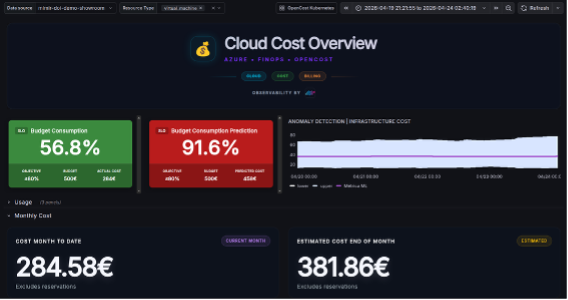
Figure 1: Cloud Costs dashboard: cloud cost metrics.
Two worlds that rarely talk to each other
Modern observability is pretty good. Platform and engineering teams have built sophisticated pipelines: CPU and memory metrics, distributed tracing, structured logs and anomaly alerts. We know when a service is degraded before the first user ticket arrives.
Cost works in exactly the opposite way.
Most organisations learn about their spending weeks after the fact. Technical teams make decisions every day — scale this, deploy that, change this architecture — and finance receives the statement at the end of the month. By the time someone connects a cost increase to its technical cause, the context has already disappeared.
Nobody remembers exactly what was deployed on the 12th.
In practice, this is what we call a financial post-mortem: analysing costs after the damage is done, with no way to correlate them with the technical events that caused them. Useful for reporting, but of little use for operations.
There is also a more structural issue: the data lives in different places:
- Technical metrics are in Grafana, accessible to the engineering team.
- Cost data is in the cloud provider’s portal, behind finance permissions and in a format designed for the wrong team.
Correlating the two requires manual work, exports and a lot of patience.
Kubernetes: the silent multiplier
The situation is difficult enough with traditional infrastructure. Kubernetes makes it even more complicated.
Kubernetes abstracts infrastructure extremely well. But financially, it introduces a cost black box: the provider’s billing data tells you how much the nodes cost, but not which application, service or team is consuming that spend.
Imagine ten services running on a shared cluster. How much does each one actually cost? Which namespace is overprovisioned? Has a team tripled its resources this month without anyone noticing?
Traditional cloud billing cannot answer those questions. At least, not without manual work and not in real time.
There is, however, a way to open up that black box: treat cost as another observable signal.
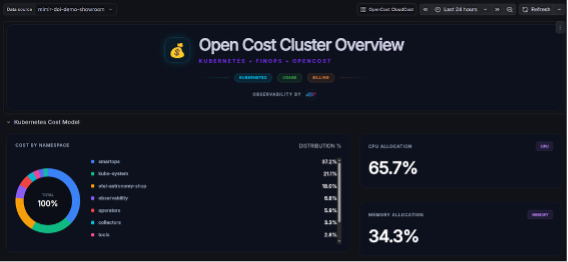
Figure 2: Kubernetes Costs dashboard: Kubernetes costs broken down by namespace.
One more signal
This is where it is worth stepping back and changing our perspective…
When a service experiences a latency spike, we do not wait until the end of the month to find out. We have alerts. We have dashboards. We have traces. The issue is detected, correlated with its context — a deployment, a traffic spike, a configuration change — and acted upon.
Why should cost be any different?
Latency, error rate and spend are signals from the same system. All three describe how your infrastructure behaves and the impact of your technical decisions. The difference is that the first two already live in your observability platform, while the third arrives by email as a PDF invoice.
If observability is an engineering responsibility, cost accountability should be too. Not as a control measure, but because teams that understand the financial impact of their decisions tend to make better technical decisions.
Treat cost as an operational signal, not a financial report. That is the key.
The stack: how it works
The idea is not to build another FinOps platform alongside your existing tools. It is to bring cost into the environment where your technical metrics already live: Grafana.
The approach brings together two complementary data sources:
- Cloud billing exports: billing exports from the provider (Azure, AWS, GCP), containing actual spend.
- OpenCost: uses the CPU and memory metrics already available in Prometheus to calculate the cost of each Kubernetes namespace, deployment or pod.
- Datadope’s own layer: unifies cloud and Kubernetes costs and exposes them to Prometheus as just another metric.
- Grafana: the final destination, where cost sits alongside the system’s other technical signals.
Once in Prometheus, actual cost data and estimated Kubernetes usage costs live in the same metrics environment:
- Correlate them with latency, traffic or error rates in the same query.
- Add cost to an existing SLO dashboard.
- Trigger an alert when spending in a namespace exceeds a threshold you define.
The result: the same dashboard that shows latency, traffic and availability can also tell you how much yesterday cost, whether you are on track to exceed this month’s budget, and which Kubernetes service accounts for 60% of your spend.
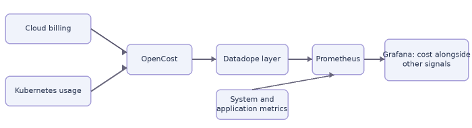
Figure 3: Stack architecture.
What changes for teams
This is not just a change of tools. It is a change in operational habits. Three situations show where it makes a difference:
“If traffic increases by 10%, why does cost increase by 40%?”
A question that was previously impossible to answer in real time can now be investigated in minutes. In Grafana, you can overlay traffic trends with cost trends by service and resource type — compute, storage and network. If there is a discrepancy, it becomes visible.
You can then correlate it with the technical events already captured in your observability platform:
- a recent deployment
- a configuration change
- an increase in replicas
Spend stops being an isolated number and gains a technical explanation.
Detect issues before the bill arrives
The case that best illustrates the value of this visibility occurred during the rollout of a new service in Kubernetes.
The service appeared to be running correctly: normal latency, no errors, green technical metrics. But after a few days, the cost dashboard showed abnormal growth in the storage category — an 80% increase in less than 72 hours. An alert fired on the cost metric, just as it would for a latency spike.
The investigation was straightforward. By correlating the timestamp of the increase in Grafana with deployment events, the team identified the service responsible. The diagnosis: a misconfiguration was generating massive, repeated writes to cloud storage — operations that were silent from a technical perspective, but accumulating real costs every second.
Without real-time cost visibility, that behaviour would have remained invisible for weeks. It would have appeared on the month-end statement as an unexplained increase, without context or an obvious root cause.
With that visibility, the incident was resolved before the bill arrived.
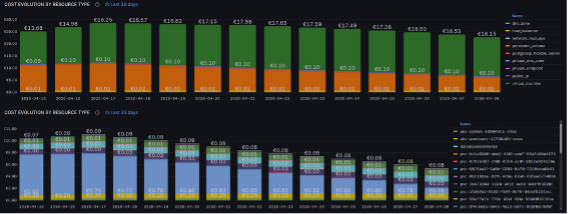
Figura 4: Histórico de coste diario por grupo de recurso y por ID de recurso.
Cost data reaches the people making technical decisions
Billing data sits in the provider’s portal, usually behind permissions that the engineers making day-to-day decisions do not have. This creates an access barrier that separates the cause — the technical decision — from the effect — the cost.
When cost data lives in Grafana, that barrier disappears. The same engineer who deploys a service can see its budget impact in the environment where they already work. No AWS Cost Explorer. No requesting reports from finance.
When teams can see what they spend as they work, optimisation happens naturally. Cost stops being someone else’s responsibility and becomes part of the quality criteria for any architectural decision.
Efficiency, not just savings
It is tempting to frame all this as a cost-reduction initiative. But that misses the bigger picture.
Technical observability is not just there to “reduce incidents”. It exists to help us operate confidently and make data-driven decisions. Financial visibility serves exactly the same purpose when applied to spending.
A well-operated system meets three conditions: it works, it is efficient, and it is sustainable. All three should be visible at the same time, to the same teams.
From uncertainty to signal
There is a pattern to observability maturity:
- First, we monitor what we can — logs, uptime.
- Then, we monitor what matters — SLOs, latency, error budgets.
- Finally, we build a culture where decisions are driven by data rather than intuition.
Cost has remained outside that cycle for years. It is still treated as a financial artefact reviewed after the fact.
Integrating it into the observability platform is not a FinOps project. It is the next logical step in operational maturity for any team that has already invested in technical observability. Because if you can tell in real time whether your system is degraded, you should also be able to tell whether it is efficient.

Ignacio Castelo González

